NEW Takeaway QR · Token screen · Multi-outlet

Your whole restaurant,
running on one smart screen.

Guests scan a QR and order. The kitchen sees it instantly. Service staff serve, the cashier bills in seconds — and you watch every rupee live, from anywhere.
No app for guestsWorks on any phoneEnglish & Hindi
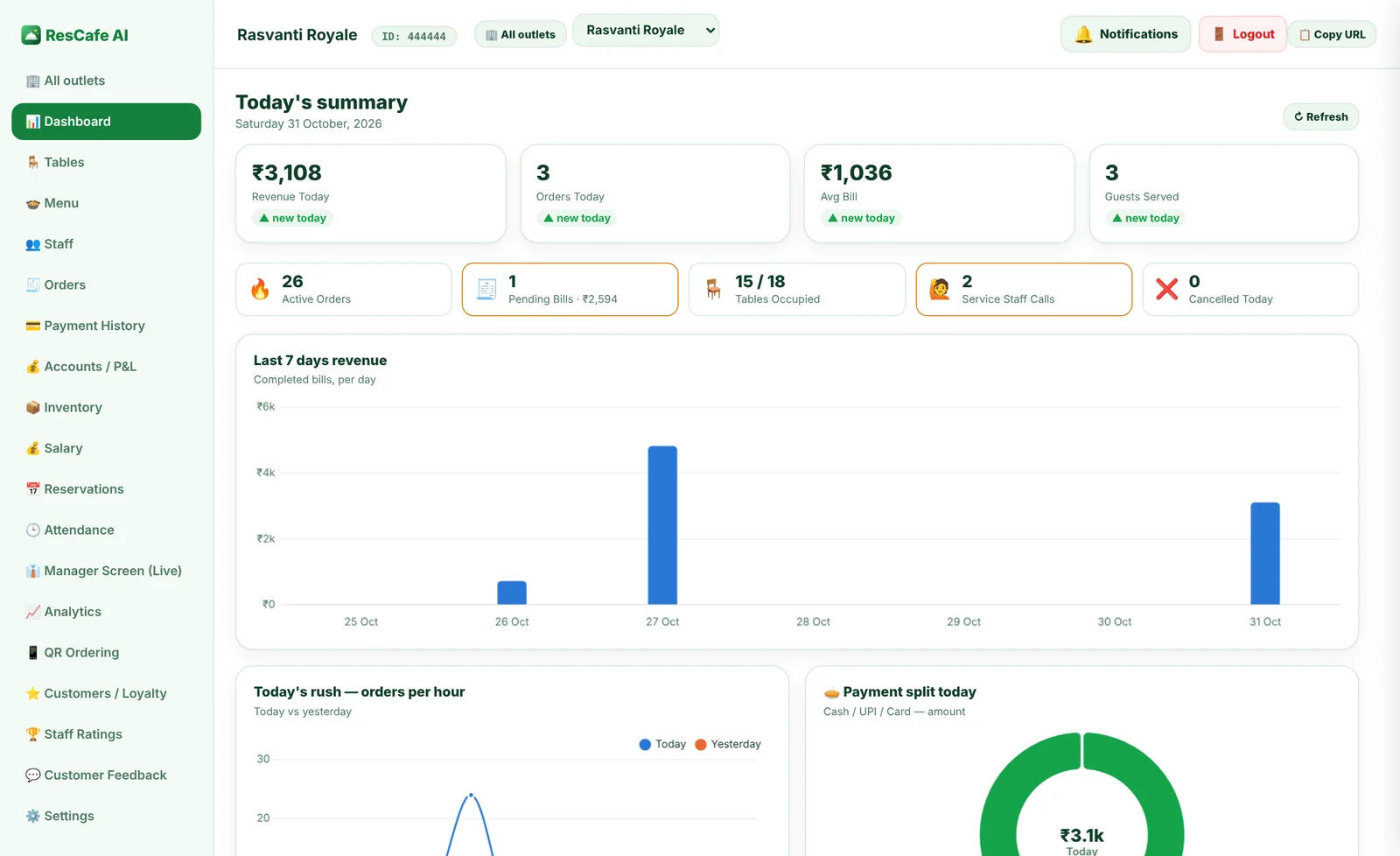
ResCafe AI owner dashboard
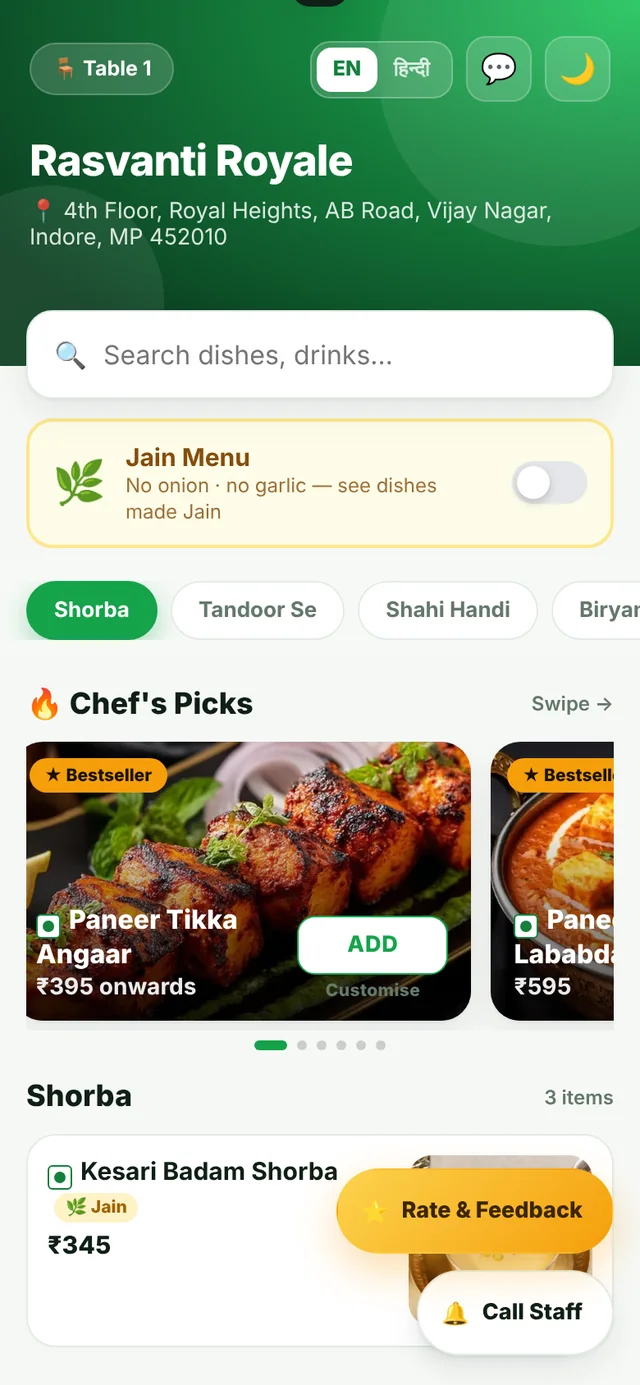
QR menu on a guest's phone
🧾
New order · Table 5Sent to kitchen · Token #106
🔔
Table 3 needs waterService staff notified
✅
₹1,900 paid via UPIBill printed · loyalty added
8 screensone login per restaurant
0 appsguests just scan & order
Liveorders, kitchen, bills & stock
1 ownerall outlets in one place
See it in action

Every screen, one by one.

Swipe or tap the arrows — from the guest's phone to the owner's reports.

QR menu on the guest's phone
Guest

QR menu on the guest's phone

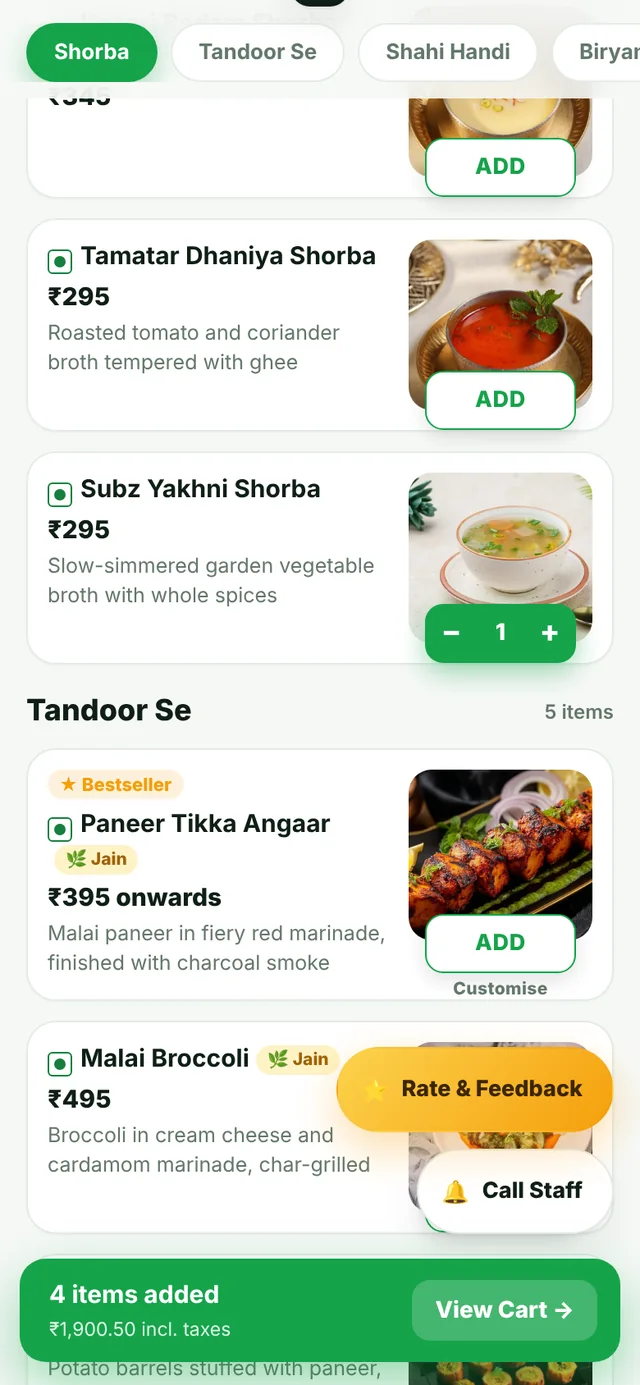
Big food photos, veg / Jain filters, sizes and extras. English or हिंदी. No app to download.
Order with name & note
Guest

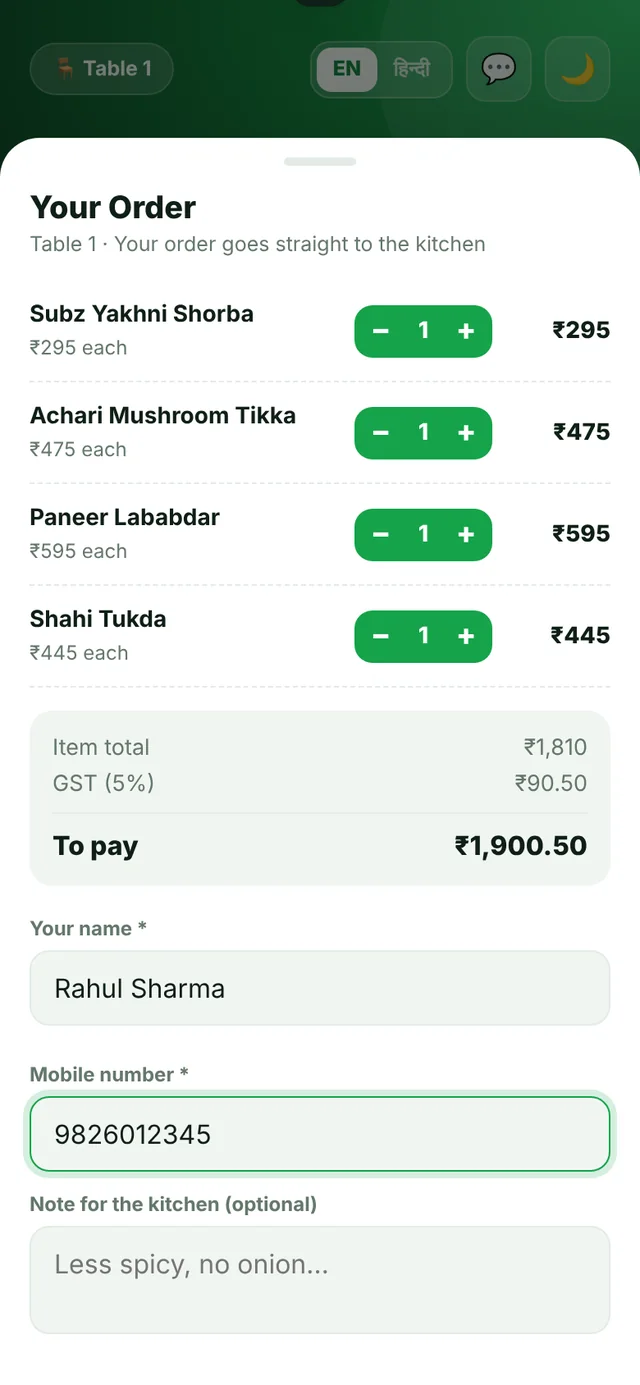
Order with name & note

Guest adds name, mobile and a note for the kitchen. GST is worked out automatically.
Call staff in one tap
Guest

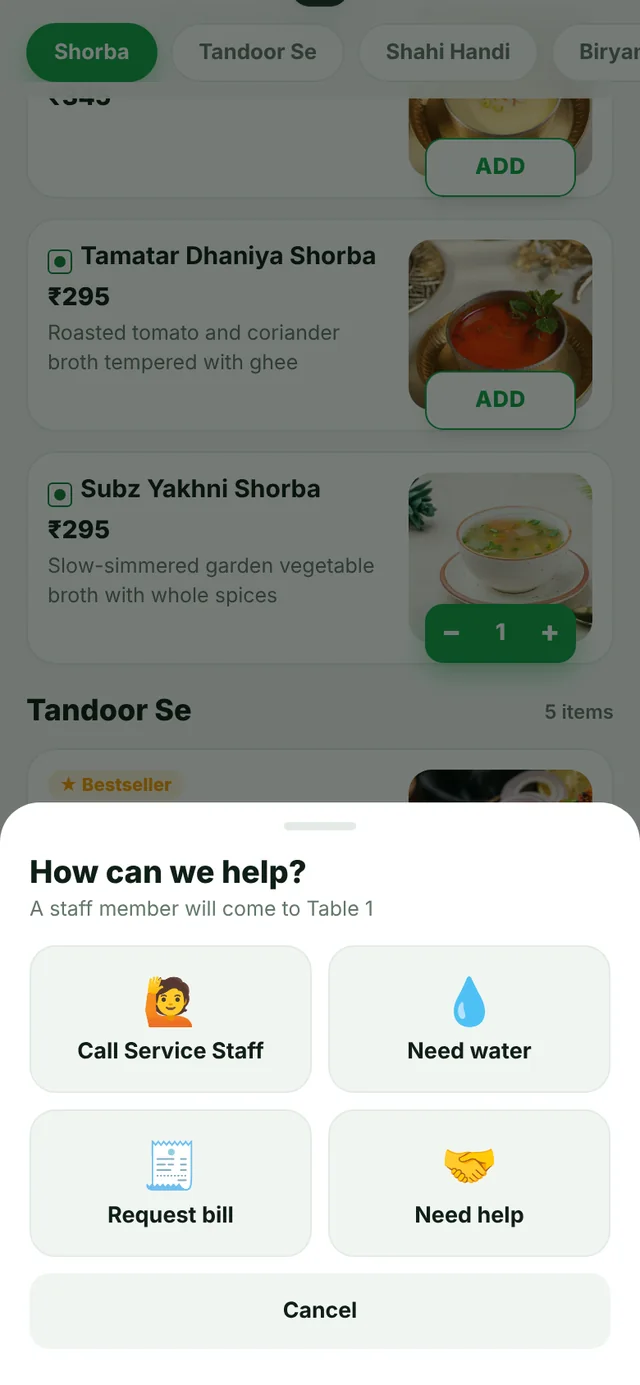
Call staff in one tap

Water, bill or help — the request rings on the right staff phone instantly.
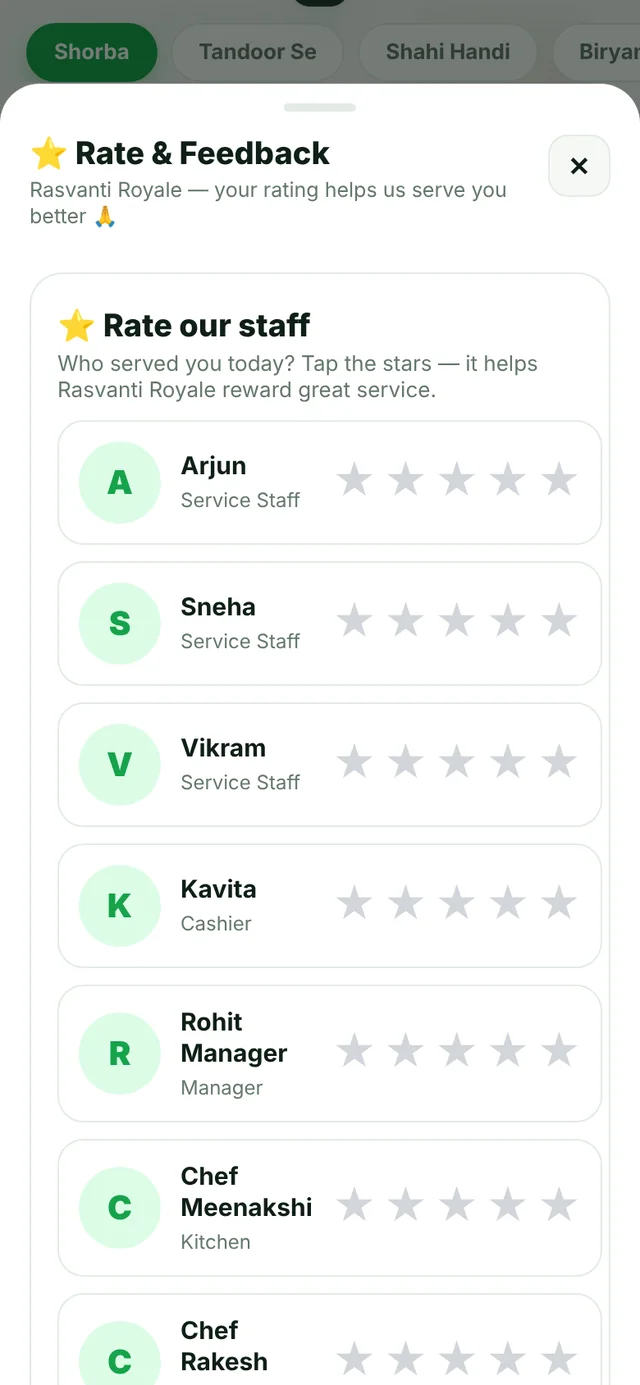
Rate the staff & feedback
Guest

Rate the staff & feedback

Stars and a short note go straight to the owner.
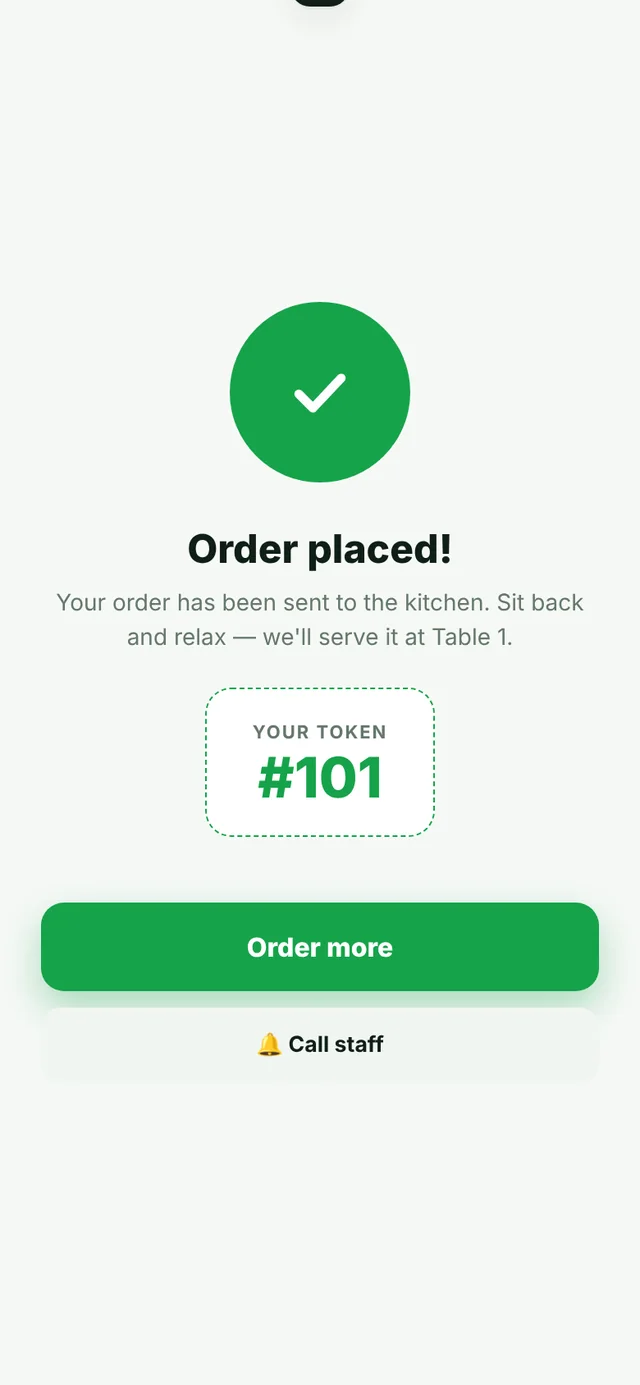
Live order status
Guest

Live order status

Guests see when the order is accepted, cooking and ready.
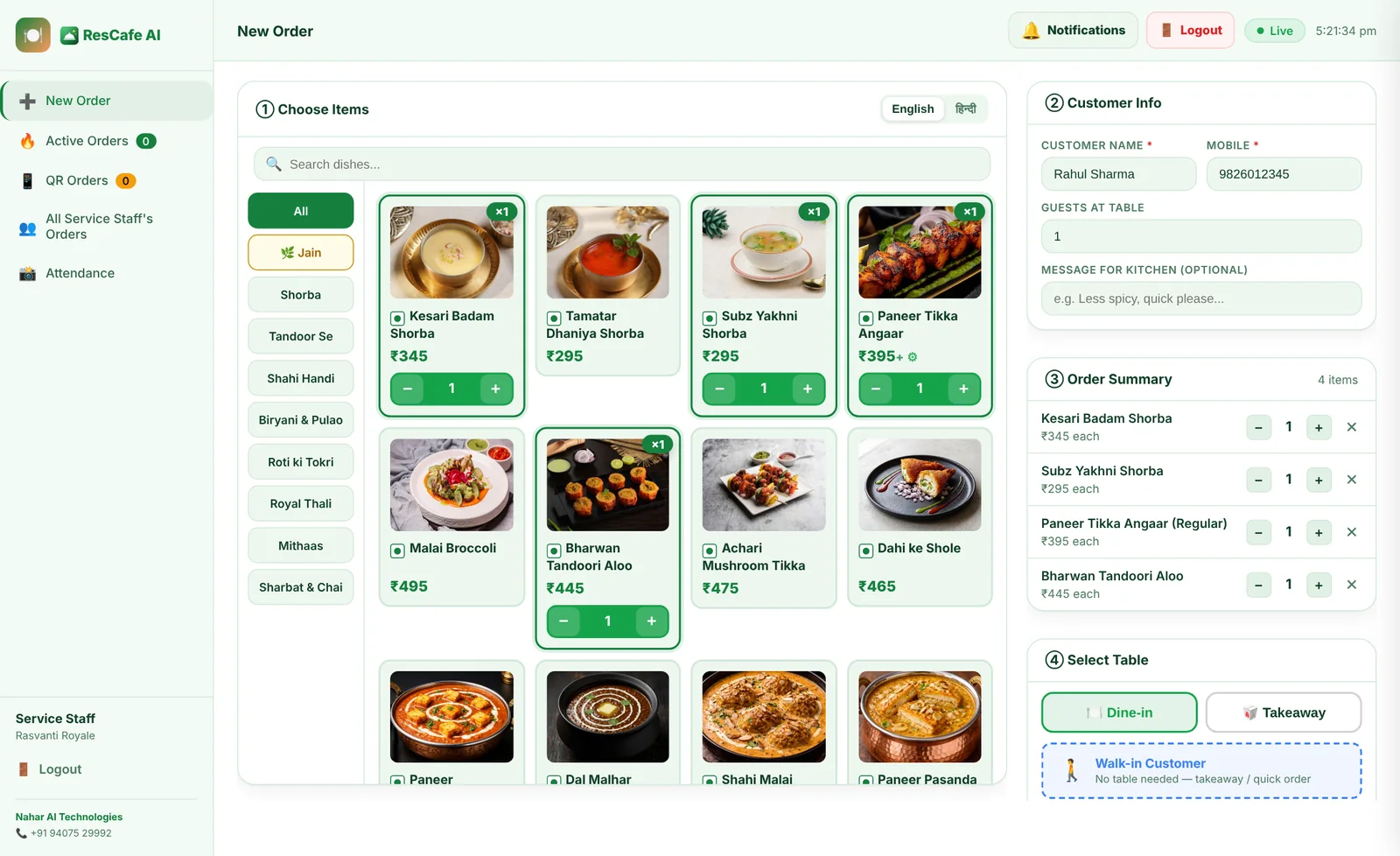
Service staff app
Service staff app
Service staff app
Service staff

Service staff app

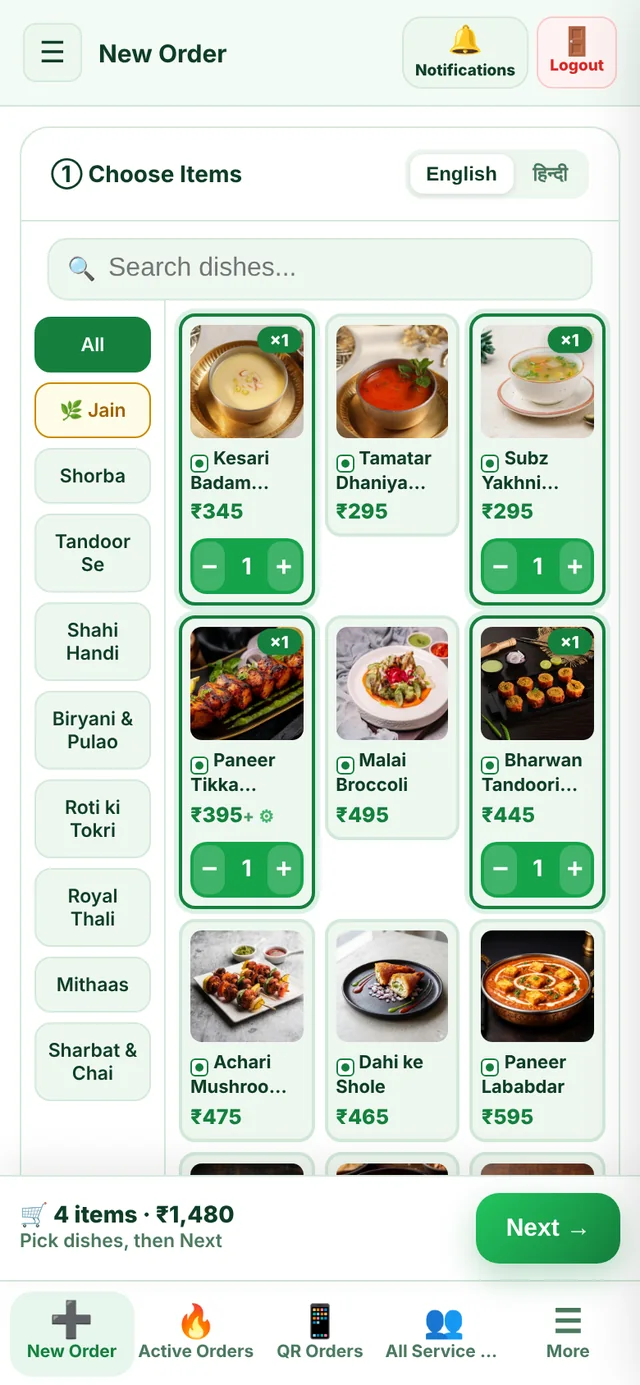
Live table map, QR orders, guest calls and "order ready" alerts on their phone.
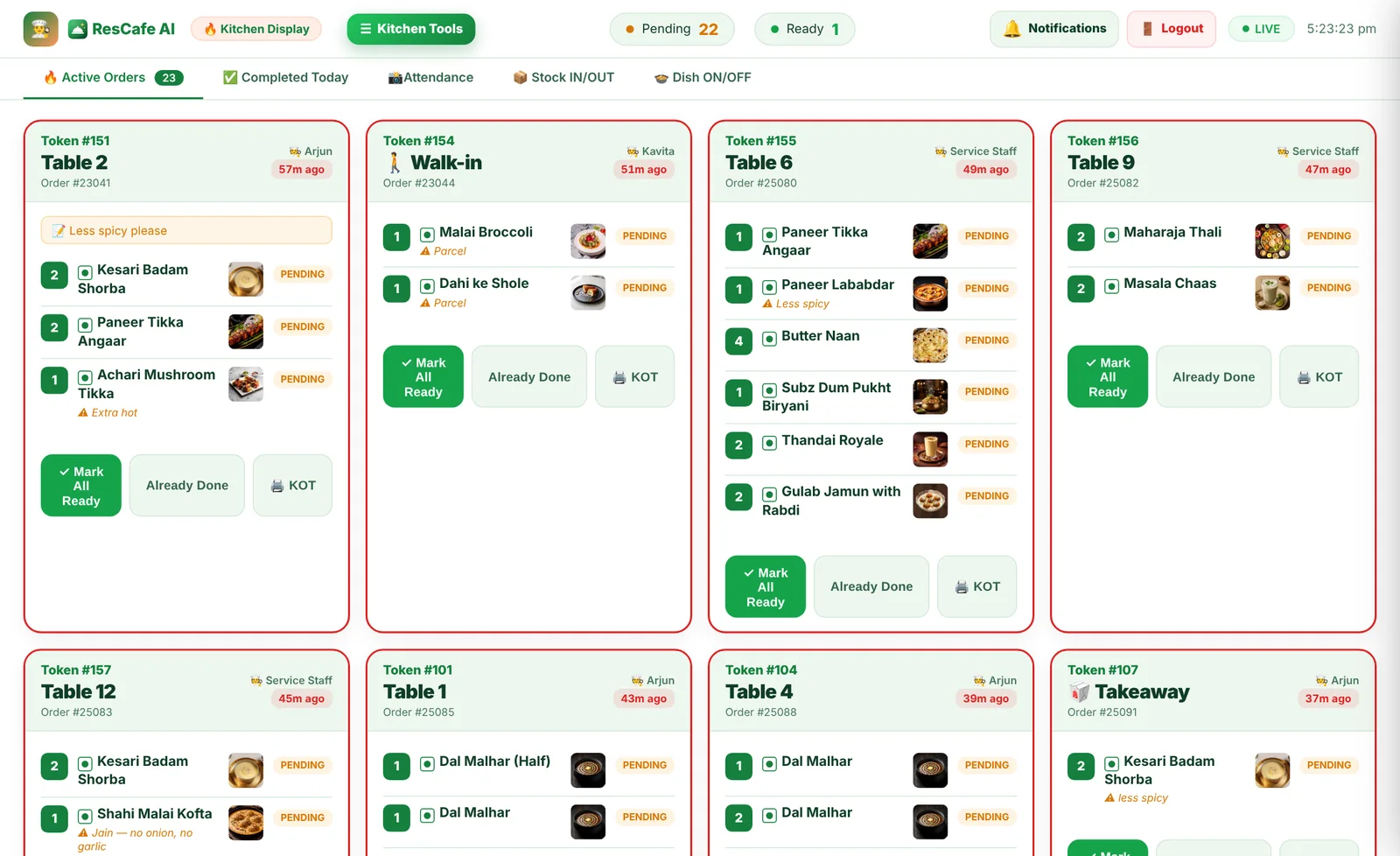
Kitchen display
Kitchen display
Kitchen display
Kitchen

Kitchen display

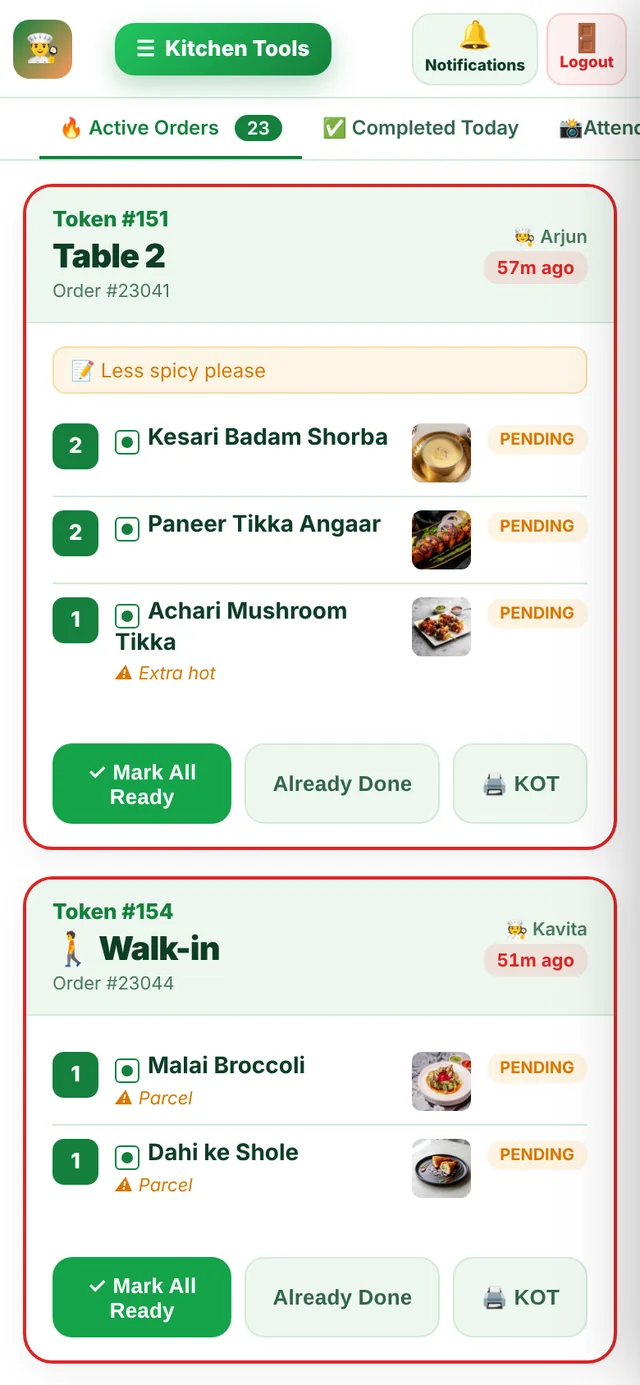
New ticket with a bell and KOT print. One tap marks it ready.
Cashier & bills
Cashier & bills
Cashier & bills
Cashier

Cashier & bills

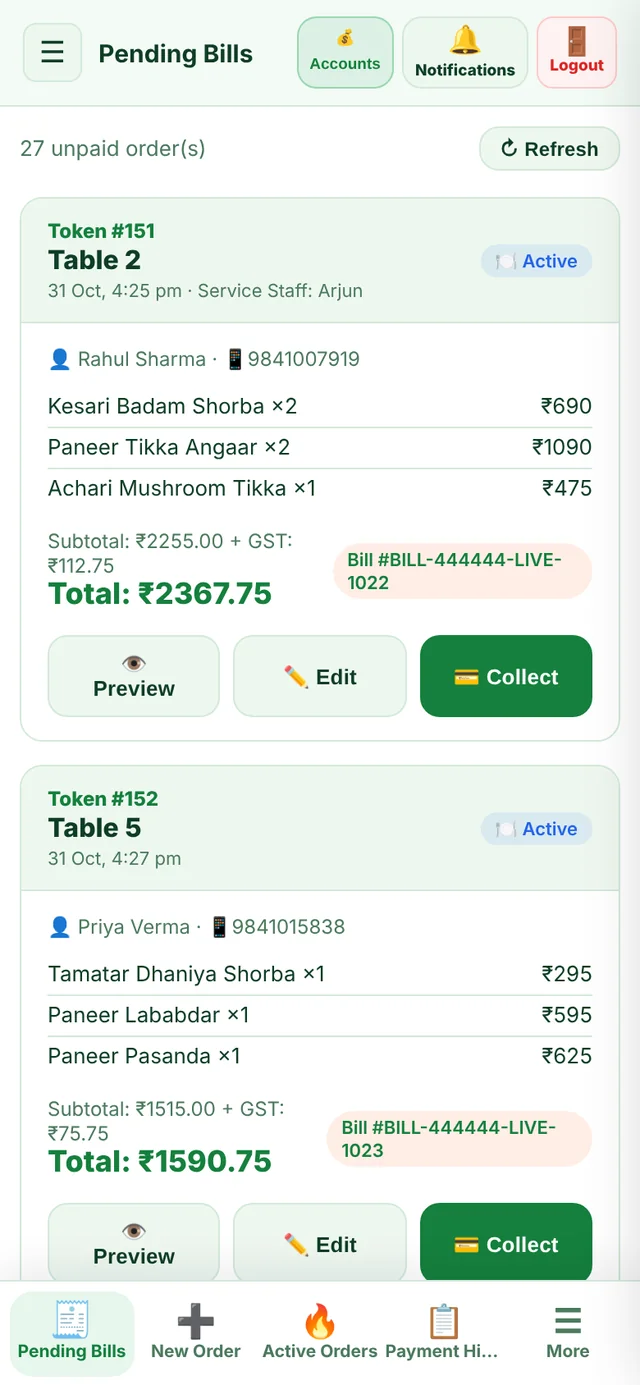
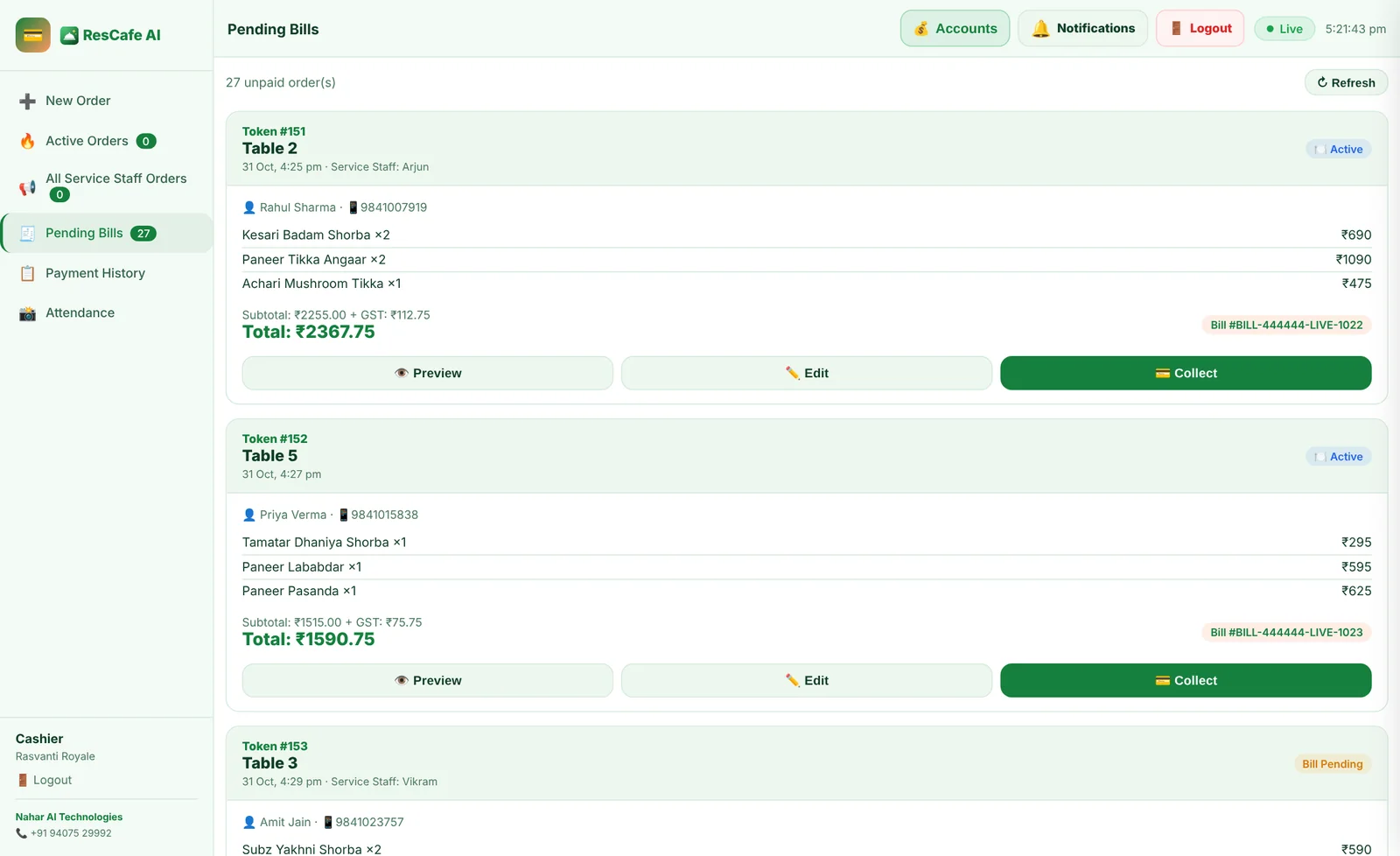
Pending bills, split, discounts, cash / UPI QR / card and instant print.
Fast billing
Fast billing
Fast billing
Counter

Fast billing

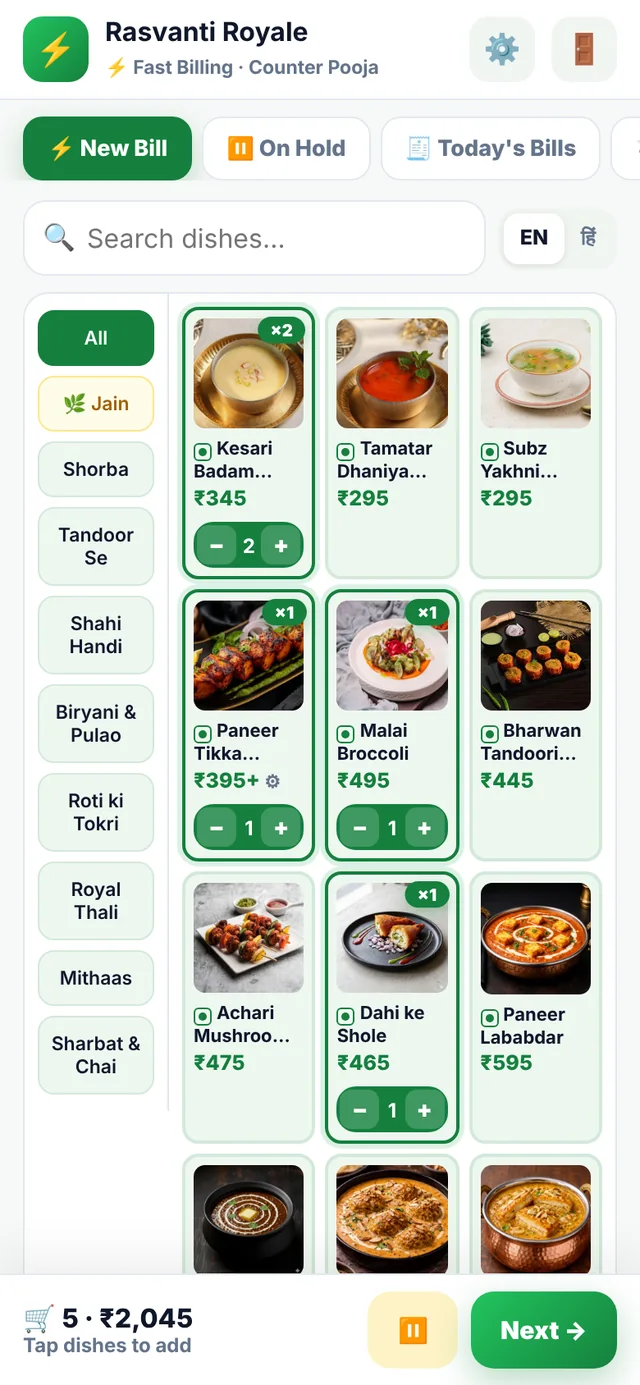
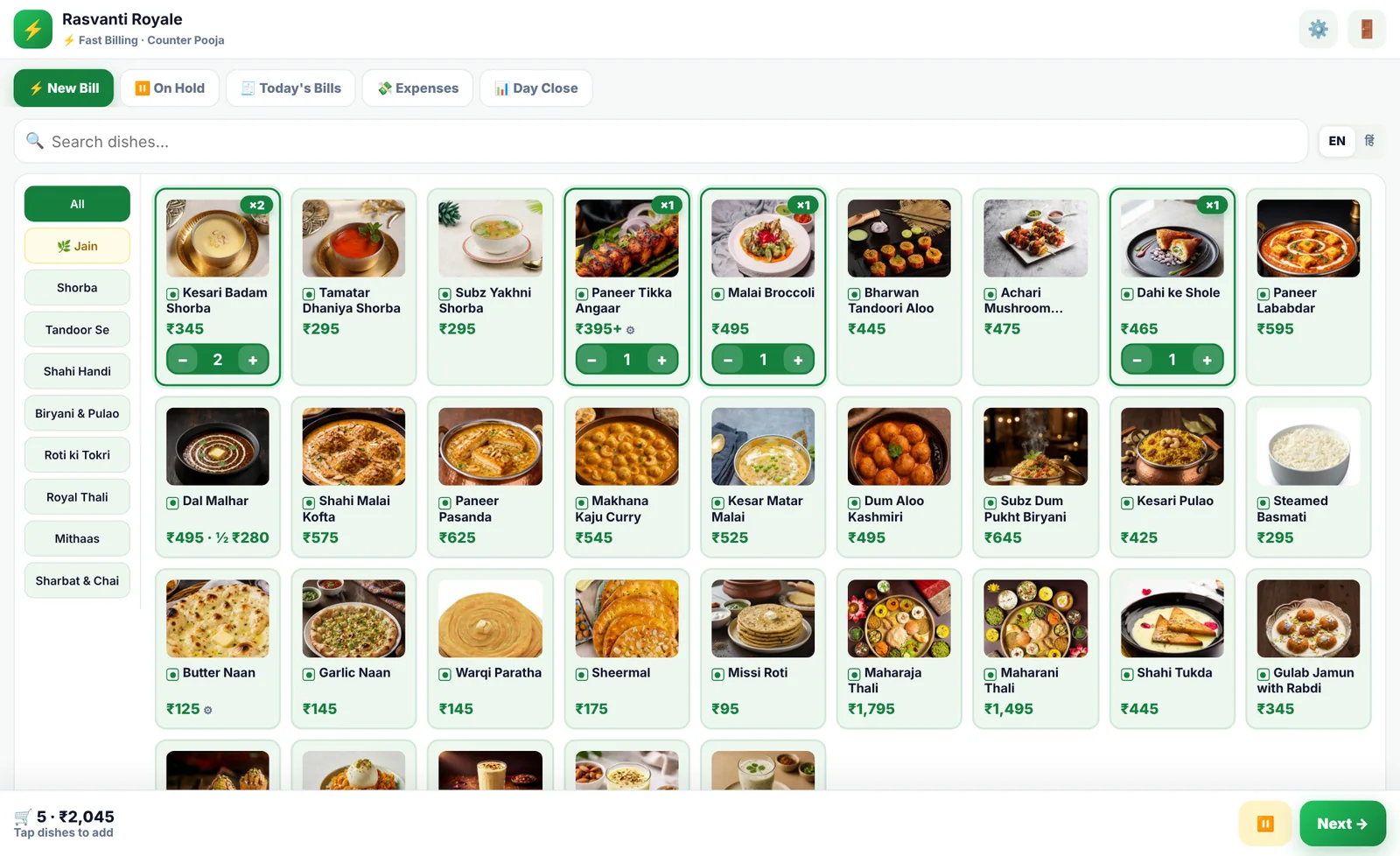
Counter billing in a few taps — categories on the side, no page reloads.
Token screen
Token screen
TV

Token screen

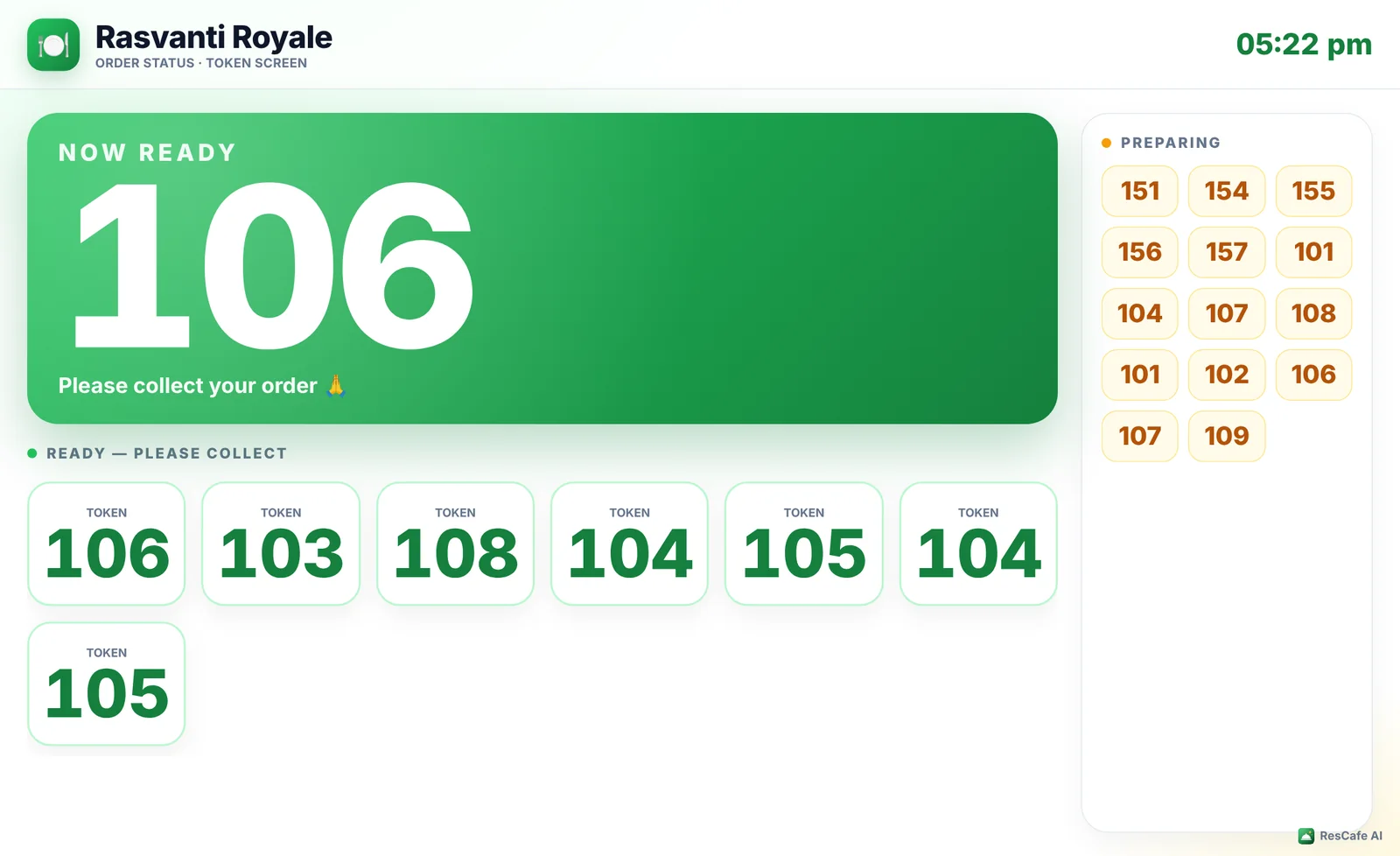
Shows preparing and ready tokens on a TV and calls the number out loud.
Owner dashboard
Owner dashboard
Owner dashboard
Owner

Owner dashboard

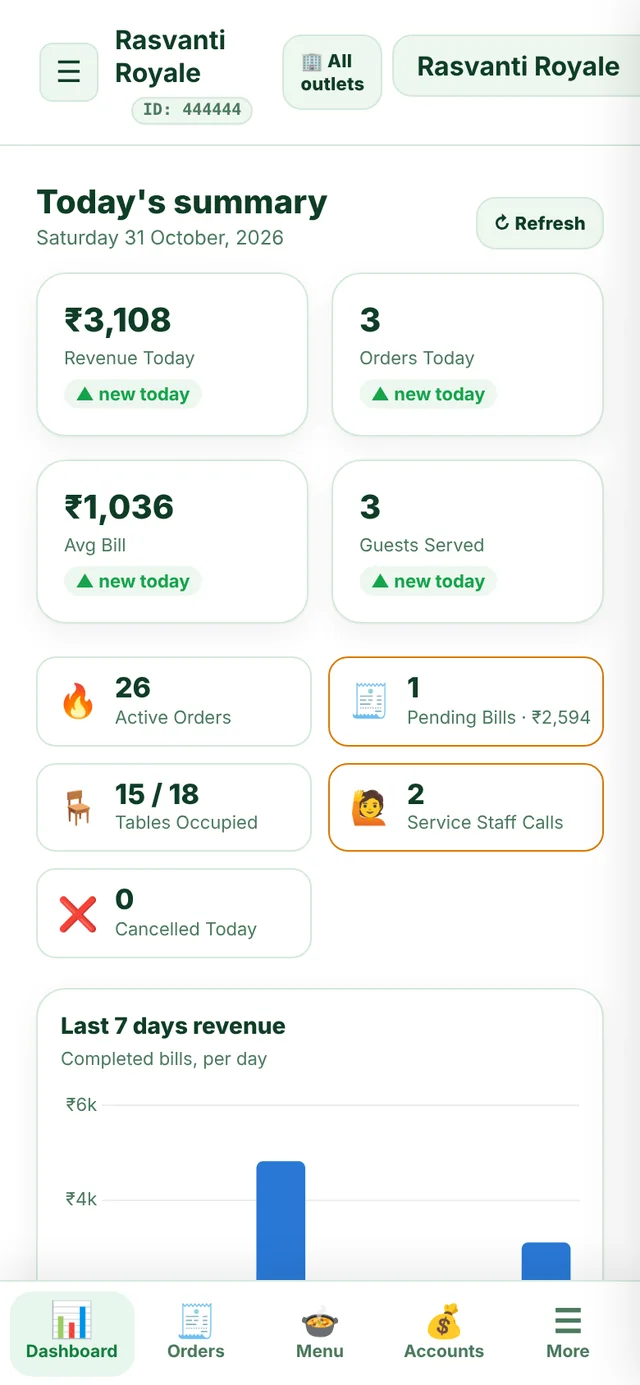
Today's sale, orders, top items and staff — live, on any phone.

Menu manager
Menu manager
Menu manager
Owner

Menu manager

Add items with photos, sizes, extras and prices in seconds.

Inventory
Inventory
Inventory
Owner

Inventory

Stock goes down with every order. Low-stock alerts before you run out.

Reports & charts
Reports & charts
Reports & charts
Owner

Reports & charts

Sales by day, hour, item and payment mode.
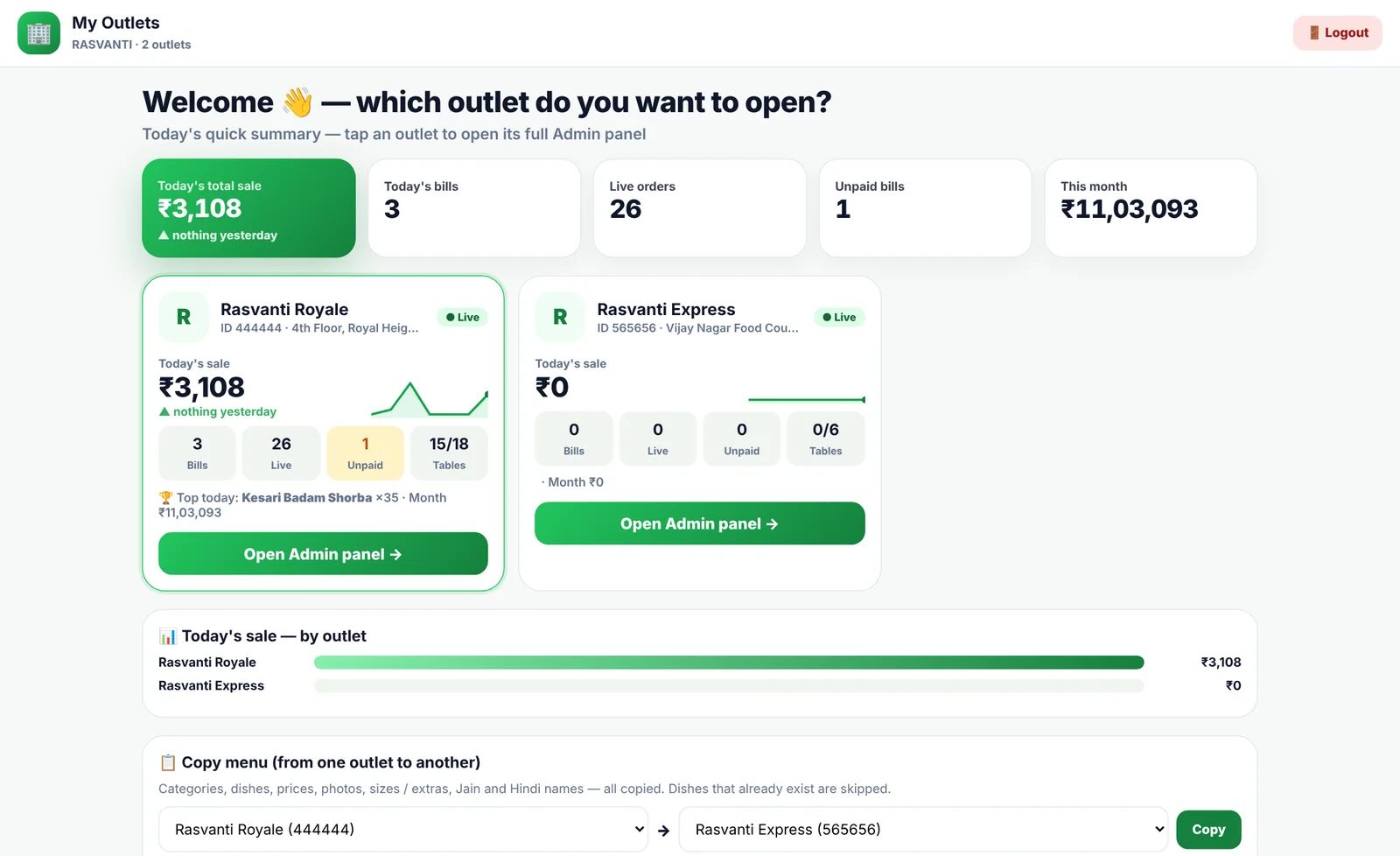
All outlets in one login
Owner

All outlets in one login

Every outlet's sale side by side. Open any outlet in one tap.

How it works

From scan to bill, without a single shout.

Every step moves by itself — the right person gets the right alert at the right moment.

📱

Guest scans & orders

Star QR on the table opens your menu — photos, sizes, extras, Jain.
🛒

Confirms the order

Name, mobile and a note for the kitchen. GST worked out for them.

👨‍🍳

Kitchen cooks

Ticket pops up with a bell and prints a KOT. One tap marks it ready.

📺

Token is called

The token screen shows the number and announces it out loud.

💳

Bill in seconds

Cash, UPI QR or card. Bill prints, loyalty points are added.

One platform, every role

A screen made for each person in your team.

Everyone logs in with your 6-digit Restaurant ID — and sees only what they need.

service staff · new order
Service staff screen
Service Staff

Take an order in 20 seconds.

Tap dishes, choose half / full or size, add extras and a note — it reaches the kitchen instantly.

  • Live table map — free, occupied, bill pending
  • Guest calls, water and bill requests ring on their phone
  • QR orders from tables appear automatically
  • "Order ready" alert the moment the kitchen finishes
kitchen display
Kitchen display
Kitchen

No more lost paper tickets.

Every order shows up as a big, clear card with dish photos, notes like "less spicy" or "Jain", and how long it has waited.

  • Bell + KOT print on every new order
  • Mark single dishes or the whole order ready
  • Turn dishes ON / OFF when stock runs out
  • Stock IN / OUT and attendance from the same screen
cashier · pending bills
Cashier screen
Cashier

Every bill, accounted for.

All open bills in one list. Collect cash, show a UPI QR with the exact amount, or take a card — then print.

  • GST, service charge and round-off as per your settings
  • Discounts and loyalty points with a reason
  • Edit a bill — the owner is told what changed
  • Day close with cash, UPI and card totals
fast billing · counter
Fast billing
Fast Billing

Built for the rush at the counter.

For cafés, QSR and takeaway counters: tap, tap, tap — pay — next customer. The kitchen gets the order on its own.

  • Same quick menu as service staff — categories on the side
  • Hold an order and resume it later
  • Expenses and day close on the same screen
  • Auto-print bill and KOT
token screen · TV
Token screen
Token Screen

Put it on any TV.

Big, clear token numbers for "Preparing" and "Ready". When an order is ready, a bell rings and a voice calls the token number.

  • Kitchen, cashier or service staff can mark ready
  • Works on a smart TV, tablet or old laptop
  • Full-screen mode with one tap
admin · dashboard
Owner dashboard
Owner / Admin

Your restaurant in your pocket.

Today's sale, live orders, unpaid bills and staff — updating on their own. Full reports when you want to dig deeper.

  • Sales, rush hours, top dishes, payment split
  • Menu with photos, sizes, extras, Hindi names, Jain
  • Inventory, salary, attendance, reservations
  • Accounts and P&L with expenses
For your guests

A menu guests love to scroll.

Big food photos, Chef's Picks, a Jain menu switch and English / हिंदी — on any phone, without downloading anything.
🔔 Call staffWater, bill or help — one tap, rings on staff phones.
⭐ Rate & feedbackGuests rate the staff who served them and tell you what to improve.
🥡 Takeaway & WhatsAppOrder from home or at the counter, pay and collect by token.
🎁 LoyaltyPoints on every bill, redeemed as a discount next time.
Call staff
Menu
Rate staff
ResCafe AI star QR standee
Star QR standee

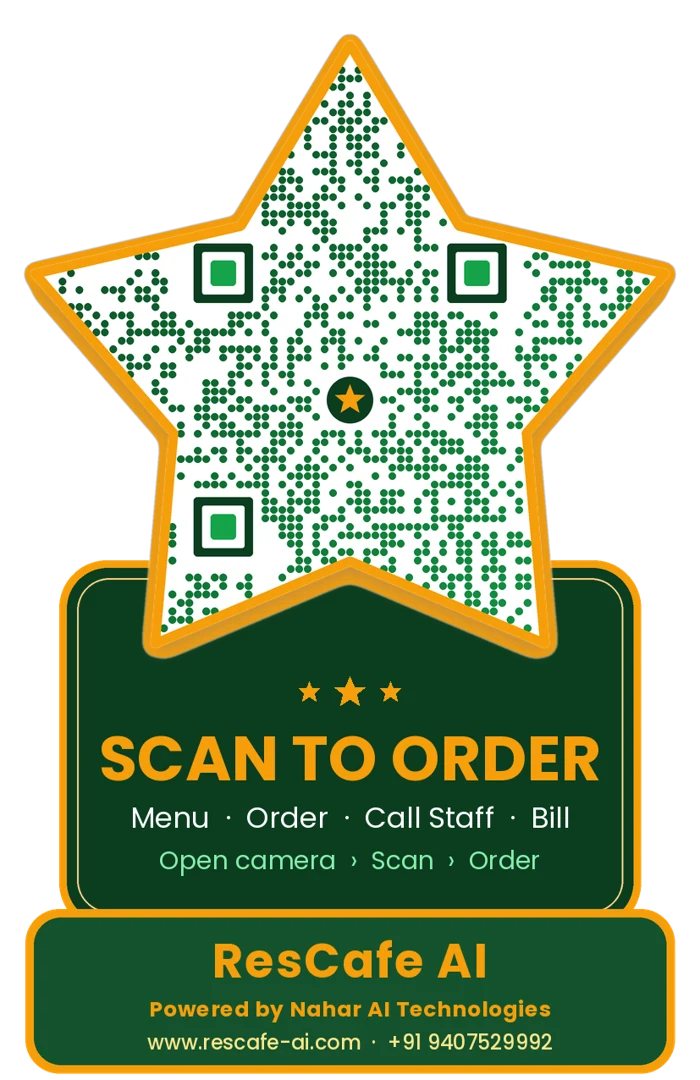
The QR guests actually notice.

A golden star-shaped QR with your logo in the middle — made for each table, printed and ready to place. Scanning opens that table's menu straight away.

🪑One QR per tableOrders arrive with the table number already set.
🥡Takeaway & flyer QRFor the counter, posters, WhatsApp and delivery.
🔒Safe by designQR works only after your admin activates it.
🎨Your logo, our starYour café logo sits in the centre of every QR.
Everything included

Less software. More restaurant.

The tools a restaurant needs every day — already connected to each other.

🧾

GST billing & print

Thermal KOT and bills, GST, service charge, round-off, PDF bills.

📦

Inventory

Stock in / out, low-stock alerts and dishes that switch off automatically.

👥

Staff & salary

Roles, PINs, selfie attendance with late / early marks, salary sheet.

📈

Analytics

Daily revenue, rush hours, top dishes, categories and staff sales.

🎁

Loyalty

Customer list with visits and spend, points you set, easy redemption.

📅

Reservations

Table bookings with reminders so no guest is forgotten.

💰

Accounts & P&L

Expenses, cash book and profit for the day, month or any range.

🌿

Jain & Hindi menu

Mark Jain dishes and add Hindi names — guests switch with one tap.

🔔

Smart alerts

Sound, voice and phone notifications for the right person only.

📲

Android app

Install on staff phones, or simply open the link in any browser.

🛡️

Secure logins

Device approval, auto-lock on wrong PIN and alerts to the owner.

🌐

English & Hinglish

Pick the language your team is comfortable with.

Multi-outlet owners

Two outlets or twenty — one login.

Each outlet keeps its own menu, staff, stock and bills. You see all of them together and open any one in a tap.

1Log in with your admin ID & passwordFrom any of your outlets' Restaurant ID.
2See today's sale of every outletBills, live orders and unpaid bills side by side.
3Pick an outlet and manage itSame name? Tell them apart by address and ID.
4Copy the menu to a new outletDishes, photos, prices, sizes and extras in one go.
my outlets
Outlets dashboard
Why switch

The difference on a busy Saturday night.

Without ResCafe AI

  • Guests wave for the menu and wait for an order-taker
  • Handwritten KOTs get lost or misread
  • "Is my order ready?" — staff run back and forth
  • Bills calculated by hand, mistakes at day close
  • No idea what sold, what wasted, who performed

With ResCafe AI

  • Guests scan and order the moment they sit
  • The kitchen sees every order instantly, clearly
  • Token screen and alerts tell everyone when it's ready
  • Bills in seconds with GST, UPI QR and print
  • Live sales, stock and staff reports on your phone
Get started

Let's get your restaurant live.

Tell us about your place. We'll call you with the right plan and a free live demo.

  • Free live demo
  • Setup, menu entry help & staff training
  • Star QR standees for your tables
  • Plans for single and multi-outlet
FAQ

Questions owners ask us

Do my guests need to download an app?

No. They scan the QR with their phone camera and the menu opens in the browser — on any Android phone or iPhone.

What do I need to start?

Any phone, tablet or computer with internet for your staff. A thermal printer is optional — orders also show on screen. A TV for the token screen is optional too.

Can my staff use it in Hindi / Hinglish?

Yes. The admin can choose English or Hinglish for staff screens, and guests can switch the menu between English and Hindi.

I have more than one outlet. How does that work?

Each outlet is set up separately with its own Restaurant ID, menu, staff and bills. We link them to you as one owner — log in once, see every outlet's sale and open any of them.

How do takeaway orders get paid?

Guests order from the takeaway QR and get a token number. They pay at the counter — only after the cashier accepts the payment does the order go to the kitchen.

Is my data safe?

Every restaurant's data is kept separate. Staff log in with their own PIN, phones can require approval, and repeated wrong logins lock the account and alert the owner.
🔐 LoginFree demo →